
What is the best way to organize medical records?

Table of Contents
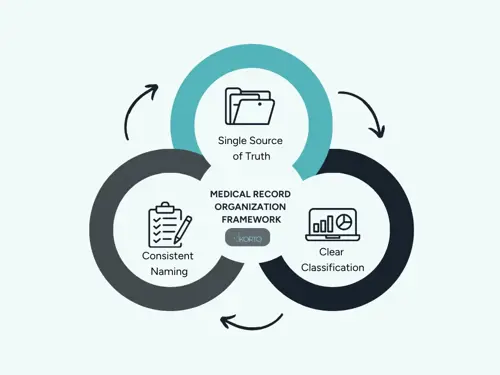
The best approach is to treat medical records like a controlled information system: one "source of truth," a consistent classification structure, strict naming rules, clear version control, and a retention + access policy that matches healthcare privacy obligations.
This is the same core logic used in professional records management and recommended in patient-facing guidance (keep one organized set of records, grouped by type and ordered by date).
Decide the purpose and scope first
A medical-record system fails when it tries to be "everything for everyone" without rules. Start by defining:
- Whose records: one patient, a whole family, or an entire clinic/hospital department
- Use case: continuity of care (doctor visits), chronic disease tracking, insurance/claims, legal documentation, or all of the above
- Format: paper-only, digital-only, or hybrid (common during transitions)
This matters because the best structure for a family binder is simpler than what a clinic needs (audit trails, permissions, standardized indexing).
Build a "single source of truth"
For individuals/families
Pick one primary home for records:
- One binder (paper) or
- One secure cloud folder / encrypted drive (digital)
The rule is: do not keep "the real copy" in your email inbox, and another "real copy" on a phone, and another in a random folder. That creates duplicates and outdated versions.
For clinics and healthcare organizations
The "source of truth" is typically:
- The EHR for structured clinical information (encounters, orders, meds, results), and
- A document/content management layer for unstructured documents (scanned referrals, consent forms, external PDFs), with governance and controlled access
This prevents records from being scattered across shared drives and inboxes, which is a common reason charts become incomplete or inconsistent. Modern EDMS centralize unstructured documents and provide the search, security, and version control healthcare organizations need.
For organizations moving away from traditional folder hierarchies, tag-based Enterprise Content Management systems offer a more flexible approach—files go to one location and are retrieved using metadata tags rather than navigating complex folder trees.
Use a clear classification (taxonomy) that matches how people search
The easiest, most durable method is:
- Patient (or Family Member)
- Category (what type of record it is)
- Date (when it happened)
This matches common medical-record organizing advice: group by type, keep key documents together, and maintain chronological order so clinicians and patients can follow the story of care.
Recommended categories (personal or professional)
These are the recommended categories:
- Clinical summaries: visit notes, discharge summaries, care plans
- Diagnoses & problem list: key conditions, onset dates, treating physician
- Medications: current list, dose changes, allergies/adverse reactions
- Labs & pathology: bloodwork, biopsy results
- Imaging: radiology reports + links/discs, imaging orders
- Procedures & hospitalizations: operative notes, anesthesia notes, ED visits
- Immunizations: vaccines, dates, lot numbers if available
- Referrals & consults: referral letters, specialist reports
- Insurance & billing: claims, EOBs, prior authorizations, receipts
- Consent & legal: consent forms, authorizations, privacy notices
If the record set is large (chronic conditions, many years), add subfolders by specialty (Cardiology, Endocrinology) or by episode (Pregnancy 2024, Surgery 2025). Keep subfolders minimal—too many layers makes retrieval slower.
For organizations handling large volumes, AI-powered document classification software can automatically tag and categorize documents based on content, reducing manual filing work.
Choose an ordering rule and never break it
Within each category, choose one:
- Newest-first (most practical for daily use), or
- Oldest-first (good for "medical timeline" review)
Pick one and apply it everywhere. Patient-focused guidance commonly recommends keeping files organized so you can quickly find recent documents and track changes over time.
Use a naming convention that sorts correctly
For digital records, naming is not cosmetic—it's retrieval. A strong convention:
- Starts with an ISO date: YYYY-MM-DD
- Includes document type
- Includes provider/facility or specialty
- Optionally includes patient identifier (for organizations)
Examples:
- 2025-11-03_LABS_CMP_ClinicName.pdf
- 2025-09-18_IMAGING_MRI-Lumbar_RadiologyReport.pdf
- 2025-01-07_VISITNOTE_Endocrinology_DrRossi.pdf
Healthcare document filing best practices commonly stress consistent indexing/labeling and standardized metadata so staff can retrieve documents quickly.
Create a "medical snapshot" page (high-value, low effort)
Maintain one page (paper or digital) that is always up to date:
- Current diagnoses/problem list
- Current medications + doses + why they're taken
- Allergies/adverse reactions
- Surgeries/hospitalizations (date + facility)
- Key contacts (GP, specialists, pharmacy)
- Insurance details (member ID, plan)
This is especially valuable during emergencies, referrals, or specialist appointments where time is limited.
Avoid duplicates and control versions (this is where systems break)
Duplicate and conflicting documents are one of the biggest day-to-day problems in medical recordkeeping:
- Two "current medication lists" with different doses
- Updated lab results saved as separate files with unclear status
- "Final" reports mixed with drafts
Set simple version rules:
- If updated, replace and archive the old version in an "Archive" subfolder, or
- Keep both but label clearly: DRAFT vs FINAL
Professional healthcare filing guidance emphasizes structured document processes so the right version is stored and retrievable. Knowing the complete lifecycle of records, from creation through active use, archival, and eventual disposal, helps prevent version control problems.
Privacy, security, and access controls (non-negotiable)
For organizations handling PHI
Your organization needs more than folders:
- Role-based access (minimum necessary) and auditability are standard expectations in HIPAA-oriented environments
- Policies and related documentation retention requirements exist (often cited as at least six years for HIPAA-required documentation), so a record system must support retention and retrieval
Healthcare organizations must implement HIPAA and GDPR-compliant systems with encryption, audit trails, electronic signatures, and granular access controls. Robust data security measures including activity logs, time stamps, and optional blockchain integration ensure tamper-proof records and regulatory compliance.
For individuals/families
Use practical safeguards:
- Store paper in a locked cabinet if possible
- Use strong passwords and avoid sharing medical PDFs casually through insecure channels
Even for personal organization, privacy is part of "best practice" because medical records contain identifiers that can be misused.
Retention: keep what you must, archive what you don't need daily
A comprehensive system includes a lifecycle:
- Active (used often): last 12–24 months, current conditions
- Reference (used sometimes): older history, resolved episodes
- Archive (rarely used): legacy scans, old claims
- Dispose (when allowed): secure destruction rules
Retention is not only "how long to keep medical charts"; it also includes compliance documentation retention rules and (in many places) state or local rules for medical record retention.
If you're running a clinic, always align retention with your jurisdiction and specialty (e.g., pediatrics and mental health often have different norms and legal requirements). That’s why it’s good to know the importance of data retention and to implement compliance-aligned retention policies which will ensure that your organization meets regulatory requirements while optimizing storage costs.
Recommended workflows (so records stay organized)
A system stays organized only if intake is standardized. Modern records management software solutions can automate these workflows, reducing manual effort and ensuring consistency.
Intake workflow (clinic or personal)
- Capture new document (scan/import)
- Validate: correct patient, correct date, legible
- Classify: category + tags (specialty, episode)
- File: correct folder + correct filename
- Review: update the "medical snapshot" if it changes meds/diagnoses
Scanning tips (hybrid/paper situations)
Healthcare document filing best practices often emphasize consistent scanning standards and indexing so scans don't become an unusable pile of PDFs.
Use a simple rule: scan to PDF, name immediately, file immediately—never "scan now, organize later," because "later" usually never comes.
Practical templates you can copy
Personal (home) folder template
/Medical Records/
/Alice Rossi/
/00 Snapshot/ (1-page summary, med list)
/01 Visits/
/02 Labs/
/03 Imaging/
/04 Medications/
/05 Hospitalizations Procedures/
/06 Insurance Billing/
/07 Consents Legal/
/99 Archive/
Clinic (organizational) indexing idea
Patient ID → Encounter/Episode → Document type → Date/time
This mirrors the way EHR documentation aims for consistent, efficient clinical documentation processes.
Implementation resources
For healthcare organizations ready to move beyond basic folder systems, comprehensive implementation guides are available for both enterprise content management and records management systems. Organizations with specific compliance or workflow needs can contact specialists for tailored consultation.
5-Second Summary